

A labeling tool is not a flow
Every labeling platform automates what happens inside a job. The annotator gets a queue of images and a class list, the reviewer gets the same queue with an accept-or-reject button, and the tool keeps the two in step. Supervisely does this well, and a team that has settled on it has no reason to leave.
What no labeling tool does is the layer above the job. Which images go out next and to whom. What happens to the ones that came back rejected. Whether anyone is idle. And the question a lead is actually asked in a standup: where is this image right now? That layer is usually a person with a spreadsheet — cutting the next batch, creating jobs, pinning them to people, chasing submissions, re-issuing rejects, and recounting what is left.
This case study keeps the tool and automates the layer above it. People still draw boxes and still decide, in Supervisely. Everything between one job and the next is done by a flow: it cuts the batches, creates the jobs, reads the verdicts back, sends rejected work out again, and keeps every image in a folder that says what state it is in.
One node, six folders
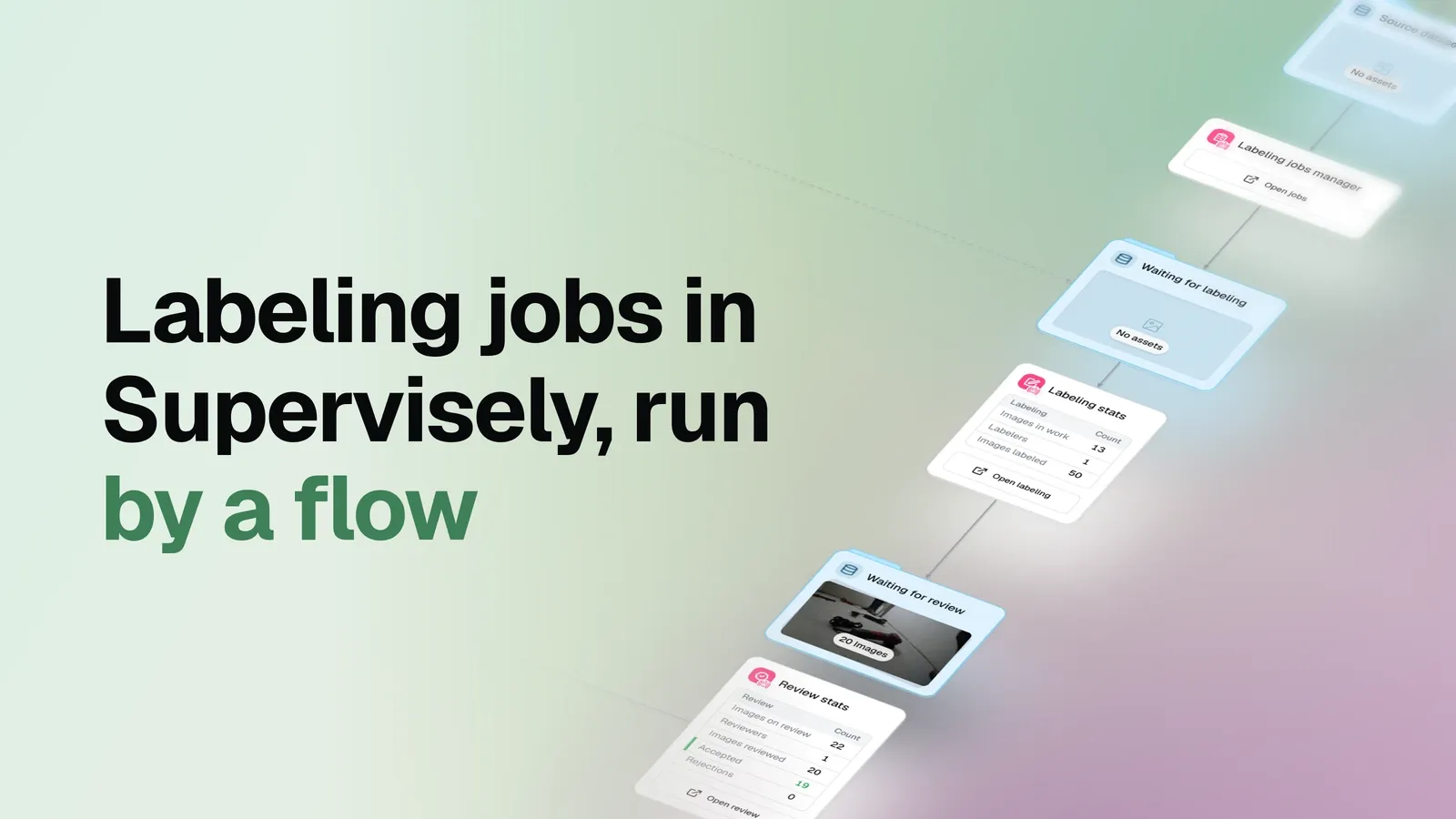
The graph is small. An import node brings unlabeled images into a source dataset, a labeling jobs manager does the work, and four preview cards plus two statistics cards show what is happening.
The manager creates the project and the dataset in Supervisely, uploads the images, and then keeps cutting batches of ten into ordinary Supervisely labeling jobs, each pinned to one annotator. It keeps at least one job active, so nobody waits for someone to assemble the next batch by hand.
Everything the flow knows about progress it reads back from Supervisely, and it expresses that knowledge as location. Six datasets in OvalBee are the states of the work:
| Folder | What sits here | What moves an image on |
|---|---|---|
| Waiting for labeling | Uploaded, not yet in a job | Being cut into the next job |
| Labeling | In a job someone holds | The job is submitted for review |
| Waiting for review | Submitted, reviewer has not opened it | The first review decision in that job |
| Review | Under review right now | An accept or a reject on the image |
| Rejected | Sent back for correction | A new job carrying it back to labeling |
| Accepted | Review-cleared, with annotations | Nothing — this is the exit |
There is no tagging convention to teach and no folder to drag work into. The verdict is the one the reviewer already gives in Supervisely; the flow reads it and puts the image where it belongs.
One round, from both sides of the boundary
The flow and the labeling tool meet at exactly two points: a job goes out, and a verdict comes back. Everything in between belongs to the people using Supervisely, and everything around it belongs to the flow.
- In OvalBeeOpen jobsThe manager card links straight into the Supervisely labeling jobs list
- AnnotatorDraw, then SubmitAn ordinary job pinned to one person, with the class list already loaded
- ReviewerCheck, then FinishThe same batch, reviewed image by image, accepted or rejected
- Back in OvalBeeAccepted or RejectedThe verdict decides the folder, and rejects leave again as a new job
Getting into the tool. Nobody hunts for the project. The labeling and review cards in the flow carry a link into Supervisely: one click and the labeling jobs list is open, already showing the jobs this flow created.
The annotator’s side. The job is an ordinary Supervisely labeling job, named by the flow and pinned to one person, holding ten images and the tool classes from the ontology. The annotator draws boxes, confirms each finished image, and presses Submit job when the batch is done. That is the entire contract: no folder to move work into, no message to send, nothing to mark as done anywhere else.
The reviewer’s side. Once the batch is submitted it becomes review work: the reviewer walks through the images, presses Accept or Reject on each one, and closes the batch with Finish. Fresh jobs keep appearing without anyone assembling them, because the flow keeps at least one job in play at all times.
The flow’s side. On its next run the flow reads those statuses back and acts on them: submitted images leave the Labeling folder, accepted images land in Accepted with their annotations, and rejected ones drop into Rejected and go out again as a new job. Neither the annotator nor the reviewer does anything to make that happen.
A rejection is a new job, not a reminder
Rejected work is where a manual process usually leaks. Someone has to remember which images came back, gather them, create a job for them, and find the same annotator.
Here the manager does it: rejected images are re-issued automatically as a new job, routed by default to the same annotator and the same reviewer who saw them the first time. The original job is left closed, as a record of what happened rather than a queue to be reopened.
The first job of this run shows the pattern in full: ten images went out, the reviewer accepted nine and rejected one, and the reject left again as fresh work. Nobody assembled that follow-up batch — and by the time of the snapshot below, three of the open jobs are rework jobs carrying corrected work back through review.
The flow also watches the clock. A job that sits untouched for four hours produces a reminder, and one that sits for a day is escalated — so “waiting on a person” is a visible state rather than a silence.
A snapshot taken mid-flight
The published example is deliberately frozen in motion, partway through the round, so the folders show work at every stage at once:
| Folder | Images |
|---|---|
| Waiting for labeling | 0 |
| Labeling | 2 |
| Waiting for review | 20 |
| Review | 0 |
| Rejected | 11 |
| Accepted | 19 |
Read it as a status board rather than a funnel. All fifty-two imported images are in play: none are still waiting to be handed out, two sit in a job being drawn, twenty have been submitted and are queued for a verdict, eleven are on their way back for correction, and nineteen are finished. Review reads zero because the reviewer is between batches at this instant — the twenty in front of them have not been opened yet.
When the round actually closes, every folder except Accepted drains to zero — and that, rather than a hand count, is what “done” looks like.
What comes back
Accepted images return to OvalBee with the annotations attached, against the tool ontology every job carries — trowel, drill, grinder, wrench, hammer, saw, tacker, cutter, spanner, bucket, knife and shovel.
The flow does not record why the reviewer rejected the second image, and it does not judge either annotation. It records that one image cleared review and the other is going back out as a new job — and it keeps both, with their annotations, in OvalBee.
What this run does not tell you
There is no quality check anywhere in this graph. “Accepted” means one reviewer decided so in Supervisely; there is no inter-annotator agreement, no accuracy against a reference, and no measure of how many passes an image needed.
Nothing here is measured in time or money, so the run supports no claim about speed, cost, or throughput. One annotator, one reviewer, and batches of ten demonstrate the mechanics; they say nothing about behaviour with a dozen annotators and tens of thousands of images.
There is also no model in this story. This is human labeling with automated logistics — pre-labeling and detection belong to other flows.
What becomes repeatable
The wiring is the deliverable. Point the manager at a different source dataset and a different ontology and the same loop runs: cut a batch, create the job, watch it come back, route the verdict, re-issue the rejects, collect the accepted work.
The policy lives in a handful of settings rather than in someone’s routine. Raise the batch size. Keep more jobs open at once. Send rework to a different annotator instead of the same one. Change how long a stalled job may sit before it escalates. The team keeps working in Supervisely, and the part that used to be coordination becomes configuration.